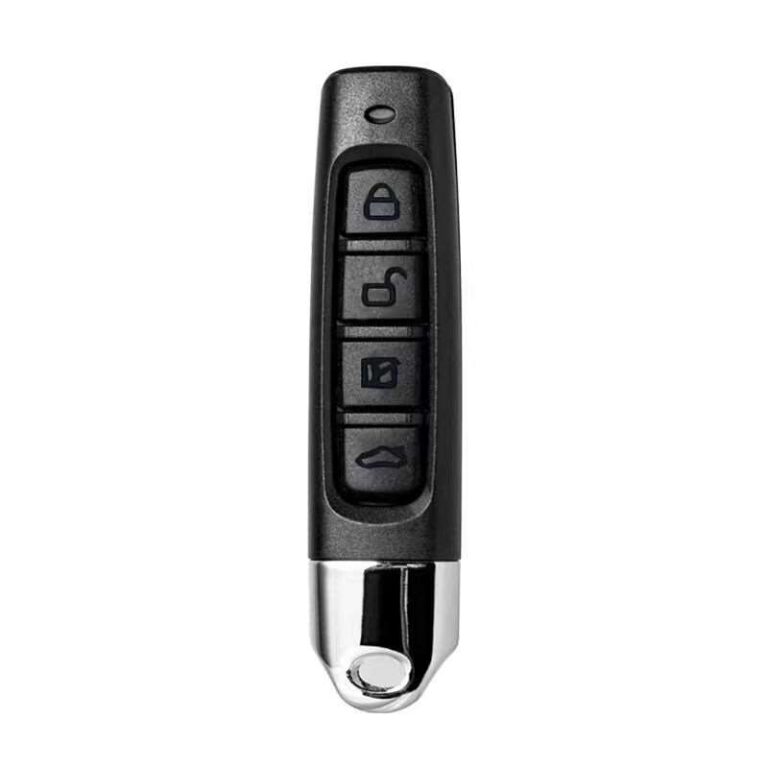
A universal 433 MHz remote copies originals that use a fixed code. First clear its memory (on most models: hold the two top buttons until the LED flashes, release one and press it three times). Then place the remotes together, hold a button on the original, then a button on the new one, and keep both held until the new remote’s LED flashes and then stays lit — the button is copied. Rolling-code remotes (rolling code, Keeloq) can’t be copied this way: they are paired to the gate receiver instead.
Lost your gate remote, need a second one for the family, or want to merge three fobs into one? A universal 433 MHz remote copies the original in a minute without a trip to a technician. But it only works with one type of remote — worth checking before you buy.
Step 0. Check your remote is compatible
- 433 MHz. Look at the label on the back or inside the remote: it should say 433 or 433.92 MHz. This cloner can’t see 868 MHz or 315 MHz remotes.
- Fixed code. Such a remote sends the same signal every time, so it can be copied. A rolling-code remote (rolling code, Keeloq, remotes of many modern systems) changes its signal with every press, and a copy won’t work.
Not sure which code yours uses? Ask the company that services the gate or barrier, or your building management. Rolling-code remotes aren’t copied — they are paired to the receiver itself by the system owner or installer.
Step 1. Clear the new remote’s memory
It’s best to clear the new remote so no factory codes remain. On most four-button cloners the sequence is:
- Hold the two top buttons (A and B) together — the LED flashes three times.
- Keep holding A, release B and press it three times.
- The LED flashes rapidly — the memory is cleared.
If the LED behaves differently, try again more slowly: the sequence can vary slightly between batches.
Step 2. Copy a button
- Put the remotes right next to each other — face to face or back to back, whichever is easier, with no gap.
- Press and hold the button on the original.
- Then hold the button on the new remote you want to record to, keeping both held.
- Wait until the new remote’s LED flashes and then stays lit — the button is copied.
- Test it at the gate and repeat for other buttons if needed.
If it won’t copy
- Change the battery in the original: a weak signal is the most common cause.
- Change the remotes’ relative position: turn one 90°, try back to back or face to face.
- Clear the memory and try again.
- If nothing works, your remote most likely uses rolling code or a different frequency.
Several remotes in one
Each of the four buttons can hold a separate remote: the yard gate, the garage, the car park barrier. Just repeat step 2 for each button with a different original. Real range is tens of metres: up to 100 m is claimed, in practice count on about 50 m depending on obstacles.
Only copy remotes you are entitled to use. If you lose a remote for shared gates, tell building management or security: with a fixed code, a lost remote opens the gate for whoever finds it.
FAQ
How do I tell fixed code from rolling code?
The easiest way is to ask the company that services the gate. Signs of rolling code: Rolling, Keeloq or Hopping printed on the remote or in the manual. If the copy doesn’t work even though the LED showed success, it is almost certainly rolling code.
Can I copy my building’s barrier remote?
Technically, if it uses a fixed code. But agree it with building management: many buildings track remotes on purpose so a lost one can be disabled.
How many remotes can one hold?
As many as it has buttons — four. Each button stores its own code.
Why does the copy only work up close?
Most often the new remote’s battery is low or the gate receiver antenna sits behind a metal obstacle. Change the battery first.
Sources and workshop experience
- ManoMano: 433 MHz cloner instructions — the typical memory-clear and face-to-face copy procedure for four-button cloners
- Wikipedia: Rolling code — how rolling code differs from fixed code and why it cannot simply be copied
Updated 30.09.2026 · PayPayPlast editorial team — we test the advice on our own repairs
Read next
 Handy in the carHow to test coolant, washer fluid and a battery with a refractometerTwo drops and you know what temperature your coolant or washer fluid is good for and how charged the battery is. How to calibrate the tool, take a sample and read the scale correctly.4 min readRead
 Plastic weldingHow to choose a hot stapler or a plastic welding ironStaples or rod, 50 or 110 W, a kit or just the tool. We compare the options and explain what to buy for your repair.4 min readRead
 Plastic weldingHow to weld plastic with a rod: step by step and 7 mistakesGroove, heat, rod feed and cooling. How to make a seam that won’t chip off, and what not to do even “to save time”.4 min readRead
Cannot find your case? Message us on Telegram and we will tell you exactly what to take for your part.
Message us on Telegram